Table of Contents
Can you build complex, production-ready software without writing a single line of code yourself? For years, the "no-code" movement offered a solution using drag-and-drop interfaces. However, a new paradigm is emerging that goes far beyond visual builders. It involves using AI agents to write actual code, managed by a human who may not understand the syntax but understands the system.
Ben Tossell, the founder of Makerpad (acquired by Zapier), has recently documented his journey of spending nearly 3 billion tokens to build everything from crypto trackers to social media bots—all without writing the code himself. His approach, often playfully termed "vibe coding," represents a fundamental shift in how non-technical founders and creators approach software development. It creates a new technical class: individuals who utilize terminals, agents, and version control not through syntax memorization, but through high-level direction and systems thinking.
Key Takeaways
- The CLI is superior to web interfaces: Building with agents is significantly more powerful in the terminal (Command Line Interface) than in web-based chat windows, allowing for better context management and direct execution.
- "Agents.md" is the new documentation: Successful AI coding relies on a robust instruction file (agents.md) that acts as a README for the AI, defining rules, context, and coding standards.
- Infrastructure enables mobility: By combining Virtual Private Servers (VPS) with messaging apps like Telegram or Slack, you can deploy code and manage repositories from your phone.
- Learning through "Forensic" Engineering: The best way to learn isn't "Hello World" tutorials, but cloning existing repositories and asking the AI to explain how the pieces fit together.
- Fail forward mindset: AI lowers the cost of failure to near zero, allowing you to build, test, and discard ideas rapidly without emotional investment.
Moving Beyond "Vibe Coding" to System Architecture
While the internet has latched onto the term "vibe coding" to describe prompting AI to build software, the reality of what Ben Tossell describes is far more rigorous. It is not simply typing a wish into a text box and hoping for the best; it is a disciplined workflow of managing AI agents.
Tossell argues that the term "vibe coding" overlooks the skill involved in the work. Much like the early skepticism toward "no-code" in 2019, dismissing this new workflow ignores the architectural knowledge required to succeed. By reading the agent's output religiously, a non-technical builder picks up extensive knowledge on how projects are structured, where logic fails, and how data flows through a system.
This approach has allowed him to ship a diverse portfolio of functioning software:
- Dynamic Data Trackers: A crypto tracker predicting market signals based on financial and weather data.
- CLI Tools: Custom interfaces for managing customer support queries and Linear issues.
- Media Generation: An AI-directed video demo system that controls the browser to record and edit its own content.
- Social Tools: A "Wrapped" product for his company, Factory, which was eventually baked into the core product.
The Agent-First Workflow: Terminal Over Web
Most non-technical users default to web interfaces like ChatGPT or Claude. However, the most effective "vibe coders" operate almost exclusively in the Command Line Interface (CLI). The terminal is where the operating system lives, and it allows the agent to execute commands, run tests, and manage files directly.
The "Spec Mode" Strategy
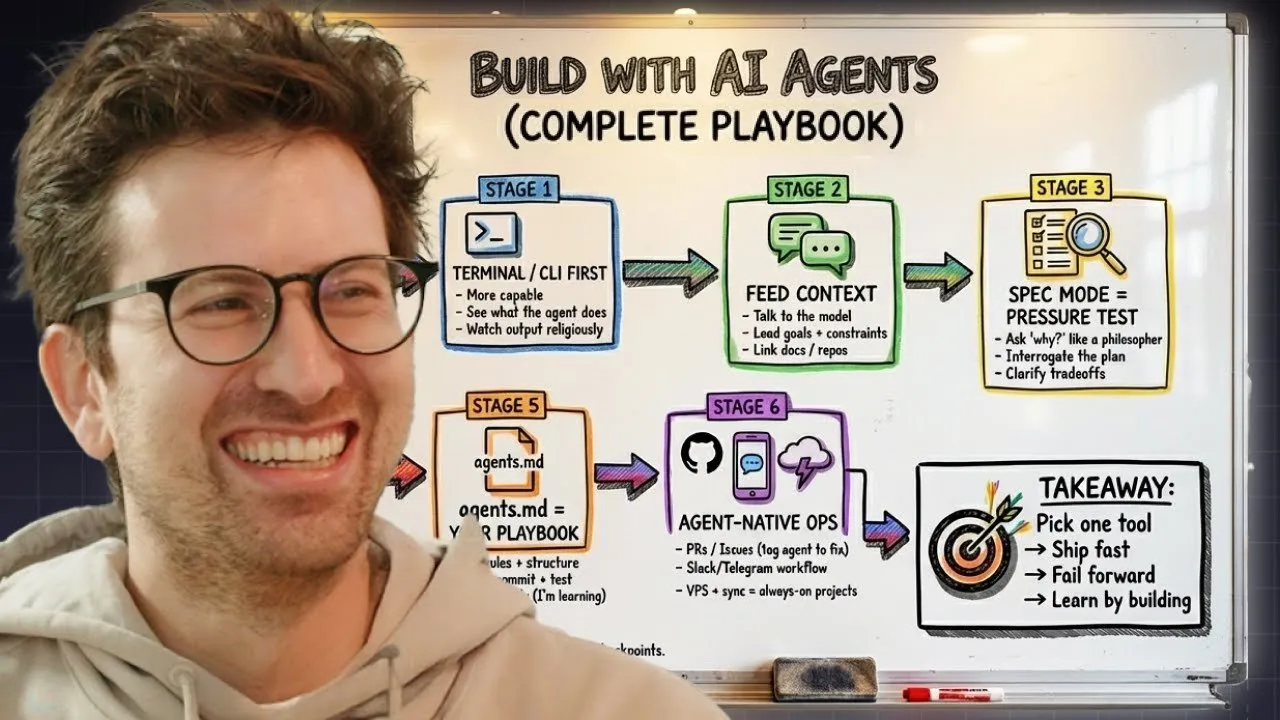
The workflow begins by spinning up a project in a CLI tool (Tossell uses Droid, a tool by Factory). rather than immediately demanding code, the process starts with conversation. You feed context to the model and switch into "spec mode" to generate a plan. This phase is philosophical; you question the agent on why it chooses a certain architecture over another.
"I generally just talk to the model a couple of times to start feeding in context... In spec mode, I'll basically question a bunch of things. I don't understand what this is, or why would we need that over this?"
Bash Commands as a Superpower
To operate effectively in this environment, one must learn the basics of Bash commands. These are instructions given directly to the operating system, such as cd (change directory) or listing files. While this sounds technical, the AI can actually teach you these workflows. You can ask the agent to create a "slash command"—a shortcut that runs a sequence of complex Bash commands automatically—effectively automating your own project management.
Standardizing Success with Agents.md
One of the most critical components of this workflow is a file often named agents.md. You can think of this as a README designed specifically for the AI. It provides a dedicated, predictable place to store context, instructions, and rules.
As you build, you will inevitably encounter bugs or repetitive errors. Instead of fixing them once, you update your agents.md to ensure the agent never makes that mistake again. This file should include:
- Style Guides: Explicit instructions on what to do and what not to do.
- GitHub Protocols: How to commit code and which account to use (work vs. personal).
- Testing Procedures: Instructions to run end-to-end tests before finalizing any changes.
For a non-technical person, end-to-end tests are a safety net. They ensure that the software actually functions as intended, catching "silly bugs" that a human developer might spot intuitively but a non-coder might miss.
Infrastructure: Coding on the Go
The "new technical class" is not tethered to a desktop IDE (Integrated Development Environment). Through creative use of infrastructure, it is possible to code from anywhere.
VPS and Remote Syncing
A Virtual Private Server (VPS) is essentially a computer that is always running in the cloud. By utilizing a VPS, you can run continuous processes—like data scrapers or crypto trackers—without needing your laptop open. Tools like SyncThing can keep your local repositories synced with the VPS, ensuring that your project state is identical whether you are at your desk or on mobile.
The Mobile Command Center
By integrating AI agents with platforms like Telegram or Slack, you can review code and trigger deployments from a smartphone. Tossell describes a workflow where he submits pull requests via GitHub, tags his AI agent to review the code, and even commands the agent to make fixes via a Telegram bot while out at a restaurant.
"It lets me code from my phone, and add new things when I'm out and about. That in combination with my Telegram bot makes it really easy for me to do things when I'm not at my desk."
The New Learning Curve: Exploration Over Syntax
Traditional computer science education starts with syntax: typing characters to make "Hello World" appear on a screen. For many, this is a barrier to entry. The AI-assisted path flips this model. You do not need to learn how to write the loop; you need to learn what the loop does within the system.
Systems Thinking
If you have experience with no-code tools (connecting Webflow to AirTable via Zapier), you already possess the foundational "systems thinking" required for software engineering. You understand that there is a frontend (interface), a backend (logic/API), and a database (storage). Transitioning to code is simply swapping visual blocks for files and scripts that the AI manages for you.
The "Silly" Questions
The greatest advantage of an AI coding companion is the psychological safety it provides. You can ask "stupid" questions without fear of judgment. If you don't understand why a specific framework is being used, or why a file structure is complex, you can ask the AI to explain it like you are five years old.
"There’s been countless times when I think about silly questions... that I have the permission to ask, because there’s no one watching me and no one shooting me down for being stupid."
Conclusion: The Generational Lock-In
We are currently in a "generational lock-in moment." The daily exposure to AI tools and the willingness to play with them is likely the single highest-leverage activity a person can engage in right now. Whether you want to launch a startup, automate your current job, or simply build for fun, the barrier to entry has collapsed.
The strategy is simple: Build, fail forward, and keep shipping.
The software landscape is about to explode with millions of new applications. Many will be low-quality, but the ability to rapidly prototype, discard bad ideas without emotional attachment, and iterate on good ones is a superpower. You don't need to be a "programmer" in the traditional sense, but you must become an expert at guiding the machine that is.